Contents
What Is It, and Why I Built It
TrackMate is a browser extension that makes logging work time in Jira painless. I built it for my own needs alongside SAP consulting: switching between multiple issues during the day and then trying to reconstruct the hours by memory in the evening was tedious and error-prone. TrackMate reduces it to starting a timer right on the issue with a single click.
What started as a timer has grown into more: the extension now includes a weekly calendar, a monthly worklog report, a statistics panel and a team dashboard. It's live for Chrome (Manifest V3) and Firefox, and the interface is available in 10 languages (Turkish, English, French, German, Italian, Portuguese, Spanish, Russian, Japanese, Korean).
An honest note: I build TrackMate alongside my consulting work. It's shipped more than ten updates since its first store release in June 2026. If you try it and leave feedback, you directly shape its development.
Key Features
Floating Timer
A draggable timer visible on every Jira page; start/pause/stop with ▶ ⏸ ⏹ buttons directly on issues and boards. The toolbar icon also changes shape while a timer runs, so you never forget it's on.
Weekly Calendar
See your week on a calendar; drag worklogs to reschedule them, resize them from the edges to change duration, or draw on an empty slot to create a new one.
Local-First Editing
Changes are kept locally first and saved in one batch with a single "Save to Jira". A colored diff modal shows exactly what will change before you commit; Ctrl+Z undoes step by step, Ctrl+S saves.
Day-Rollover Protection
If a timer crosses midnight or exceeds your limit, TrackMate freezes it and asks you — nothing is saved to Jira without your confirmation. The correct day is confirmed with an explicit date picker.
Pomodoro Mode
Optional work/break reminders (25/5 min by default). Deliberately notification-only: it never pauses or starts the timer for you — the break decision stays yours, and your worklog is never distorted.
Monthly Report & Invoice Mode
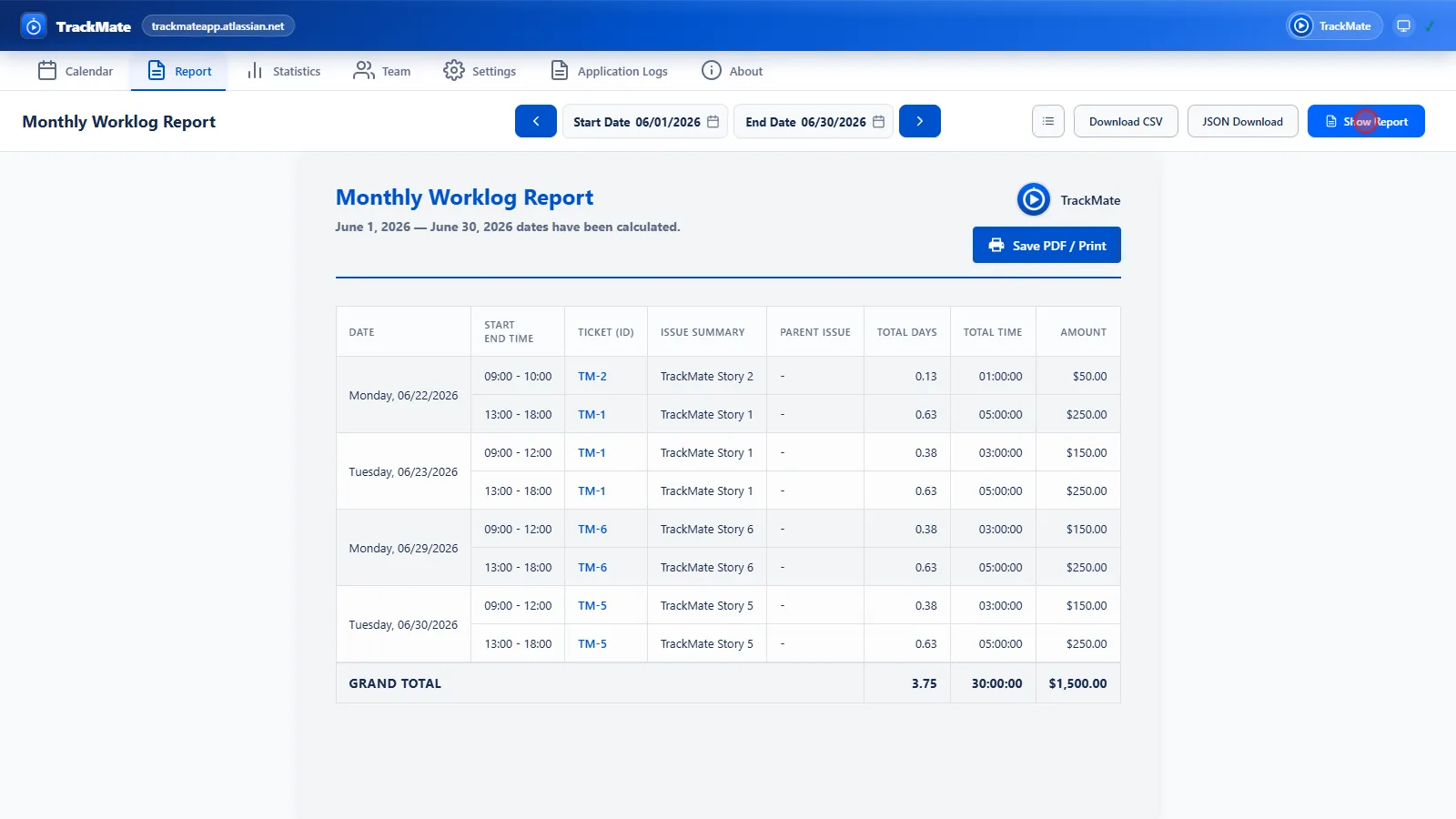
A monthly worklog report with columns you choose. Add an hourly rate and currency to get an "Amount" column and a grand total. Export as CSV, JSON or PDF.
Statistics Panel
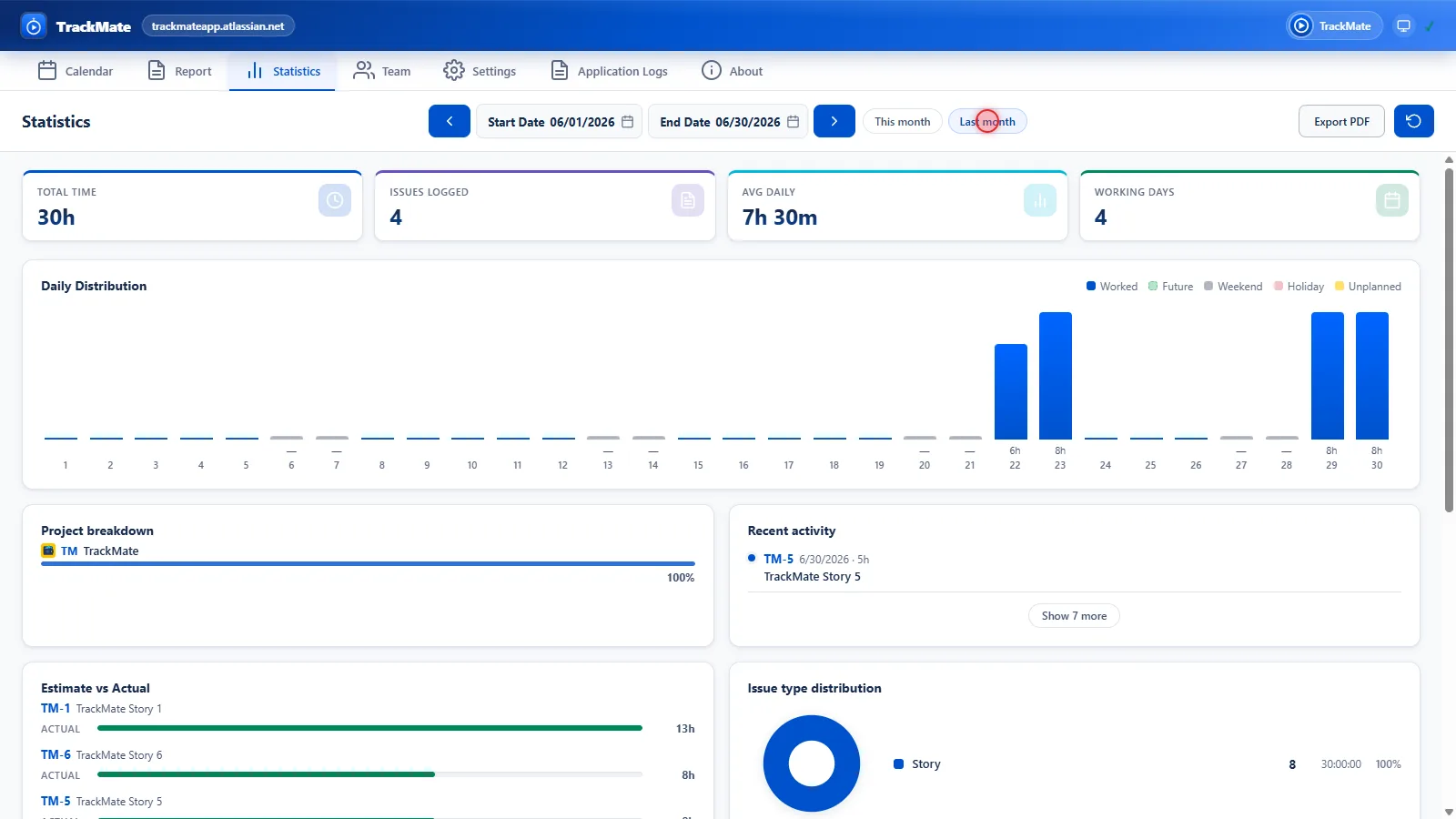
Daily distribution chart, project breakdown, issue type and status distribution, estimate-vs-actual comparison, and daily goal tracking.
Team Dashboard
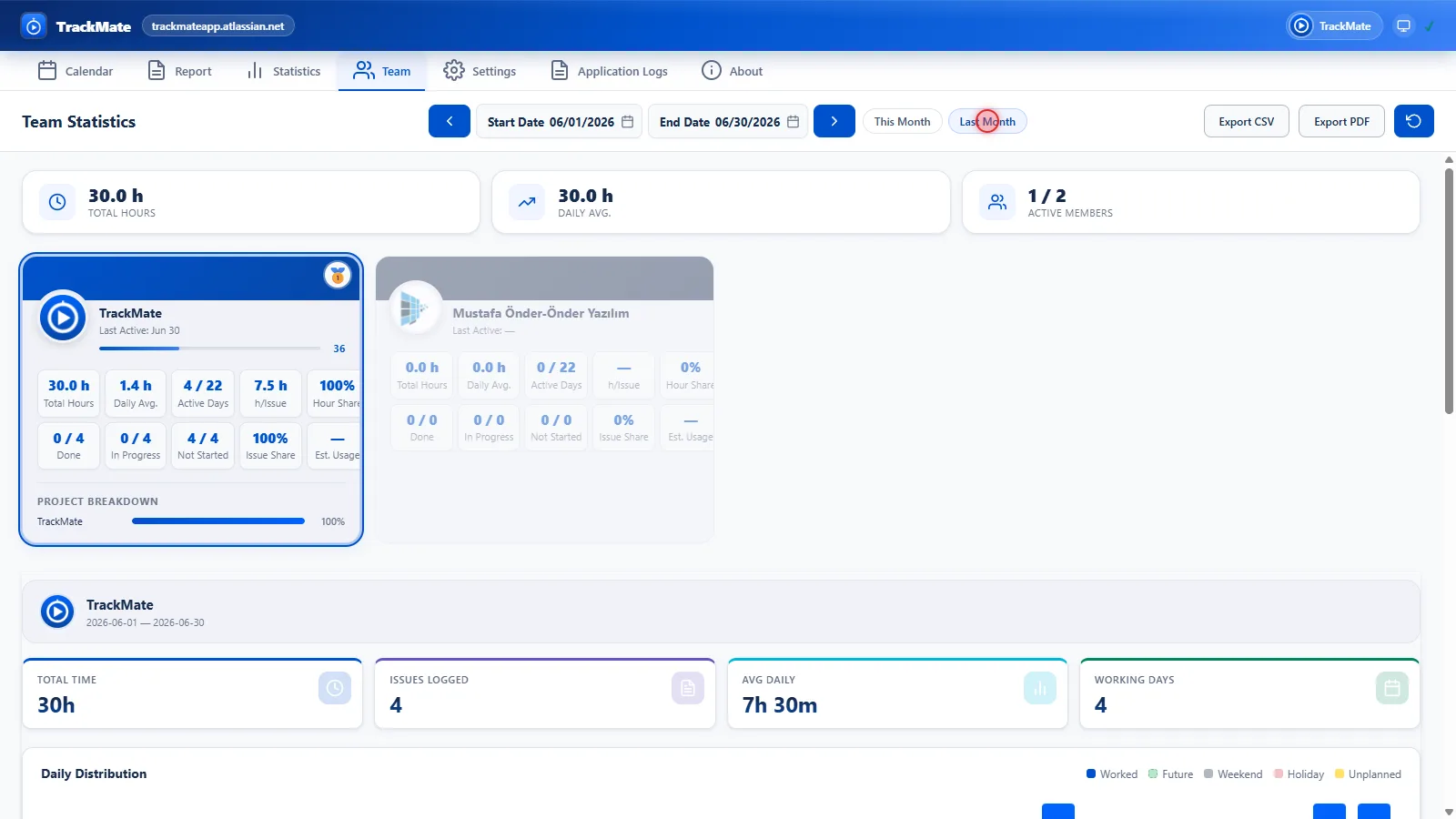
A per-member worklog dashboard and performance score. The score is self-relative: a consultant working 3 days a week isn't unfairly compared on raw hours against someone working 5.
JQL Presets
Store your frequently used JQL queries as ready-made filters, apply them with one click, and drag the resulting issues straight onto the calendar to log time retroactively.
Multi-Domain & Cross-Device Sync
Each Jira domain has independent settings and its own timer, so you can run timers concurrently across client instances. Back up your settings in your own Jira account and restore them on another device, with your confirmation.
Also included: public holidays and work-day calendars, daily goal tracking, one-click templated issue copying (Copy Issue), light/dark/system theme, and a guided welcome tour after install.
What's New in 1.5
The details on this page reflect v1.5.3 (August 2026). Highlights added since 1.4:
- Day-rollover / long-timer protection (1.5.1): If you shut down your computer with a timer running, the next day it used to get logged either to the wrong date or with an inflated duration. Now that timer is never saved silently: it freezes, shows a warning badge, and asks you to confirm the correct day and duration before saving.
- Invoice mode (1.5.0): Add an hourly rate and currency to your report to get an "Amount" column and a grand total — a simple timesheet for freelancers.
- Pomodoro mode (1.5.2): Optional work/break notifications that never touch the timer itself.
- Quick-start from the popup (1.5.2): Search for an issue and start a timer directly from the extension popup, without having to find the right Jira page first.
- Expanded welcome tour (1.5.1): The post-install tour now also covers the Report, Statistics and Team tabs.
- Dark mode on the Jira page itself (1.5.0): The timer and dialogs injected into Jira now follow your OS dark theme instead of staying white.
- Reliability fixes (1.5.1): Fixed the extension getting stuck "connecting" after long idle periods, sleeping/frozen Jira tabs, and network requests with no timeout.
Screenshots & Demo
The images and screen recordings below are taken from real usage of the extension (demo Jira environment):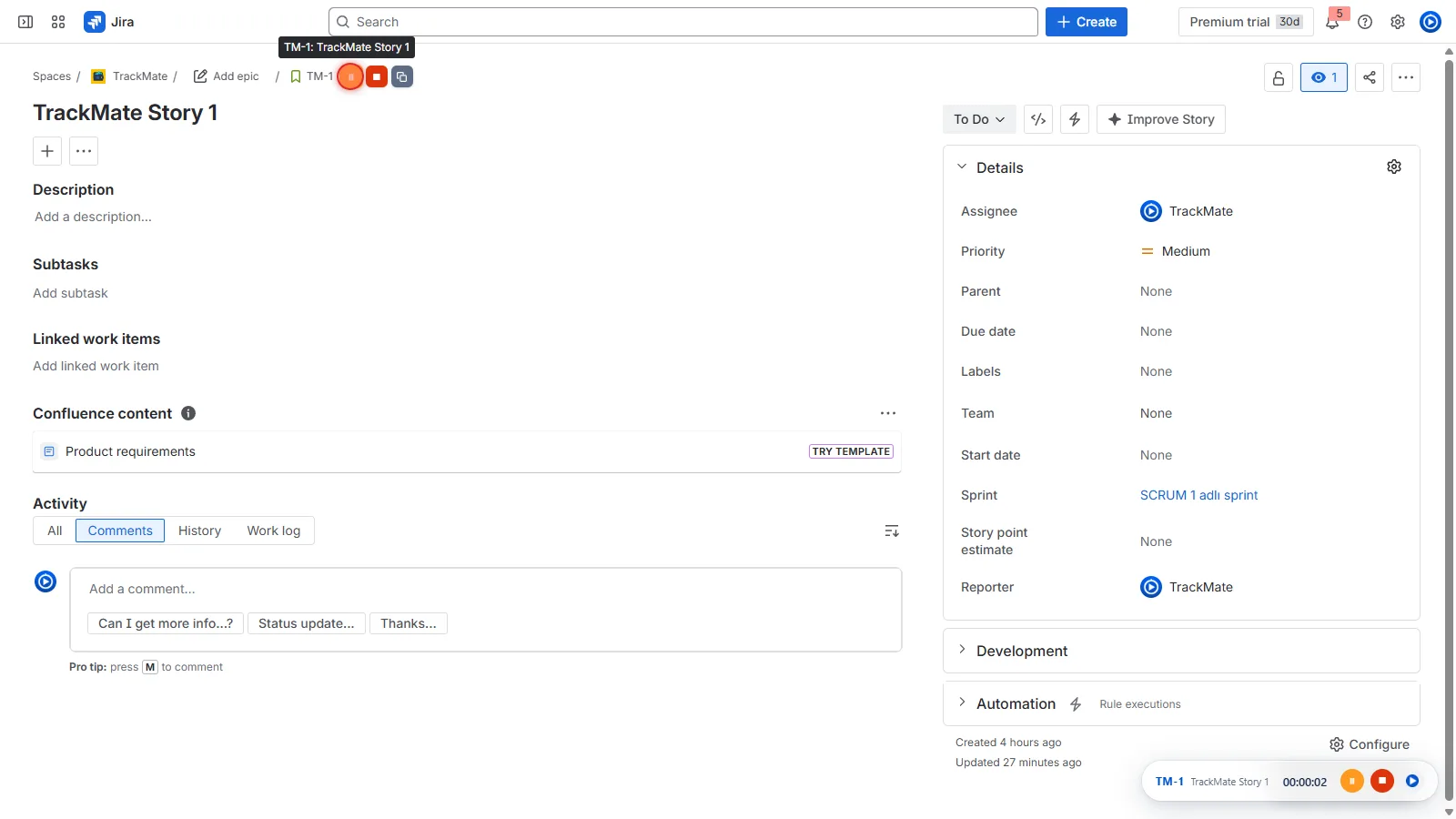
Privacy & Security
Your time records are business data; who spent how many hours on which project should not end up on a third party's server. TrackMate is designed around that principle — in the words of the store listing, "100% private":
- No server: the extension has no backend of its own; your data stays between your browser and your own Jira instance.
- No OAuth / no separate account: it uses your existing Jira session (cookie); you never hand TrackMate a password.
- Single host permission: the extension only requests access to
*.atlassian.net— no other site. - Strict CSP: no
eval(), no remote code execution; all code ships inside the package. - Minimal permissions: only
storage(local data),alarms(auto-save, daily summary, timer-review checks, Pomodoro) andnotifications(for alerts you enable) are requested.
Every one of these claims can be verified in the extension's manifest, and the store pages list the permissions openly.
Under the Hood
For the curious: TrackMate runs on Manifest V3 on Chrome, with a separate build/zip pipeline for Firefox. The ES module source is bundled with esbuild; unit tests run on Vitest, end-to-end tests on Playwright, and every release goes through lint → build → test → packaging gates.
Requests to Jira are restricted to an allow-list of REST paths (/rest/api/2/, /rest/api/3/) and methods; tokens and e-mail addresses are stripped from log entries before they're written. This is the same quality standard I apply in client projects — built to avoid the "works today, unmaintainable tomorrow" extension trap.
Installation & Requirements
After installing, you are up and running in three steps:
- Open Jira: log in to your Jira Cloud instance (
*.atlassian.net) as usual — TrackMate securely uses your active session. - Start a timer: click the ▶ button that appears on issue pages and board cards.
- Open the calendar: click the TrackMate icon in your toolbar to view the weekly calendar, edit worklogs and sync them to Jira.
Requirements: a Jira Cloud account (*.atlassian.net) — Jira Server / Data Center is not supported; Chrome 120+ or Firefox 140+; an active Jira session in the same browser profile.
TrackMate is free to install from the stores:
The way this extension was built is a concrete example of its software-quality approach. The same care is applied to SAP projects.
Request an Initial Consultation